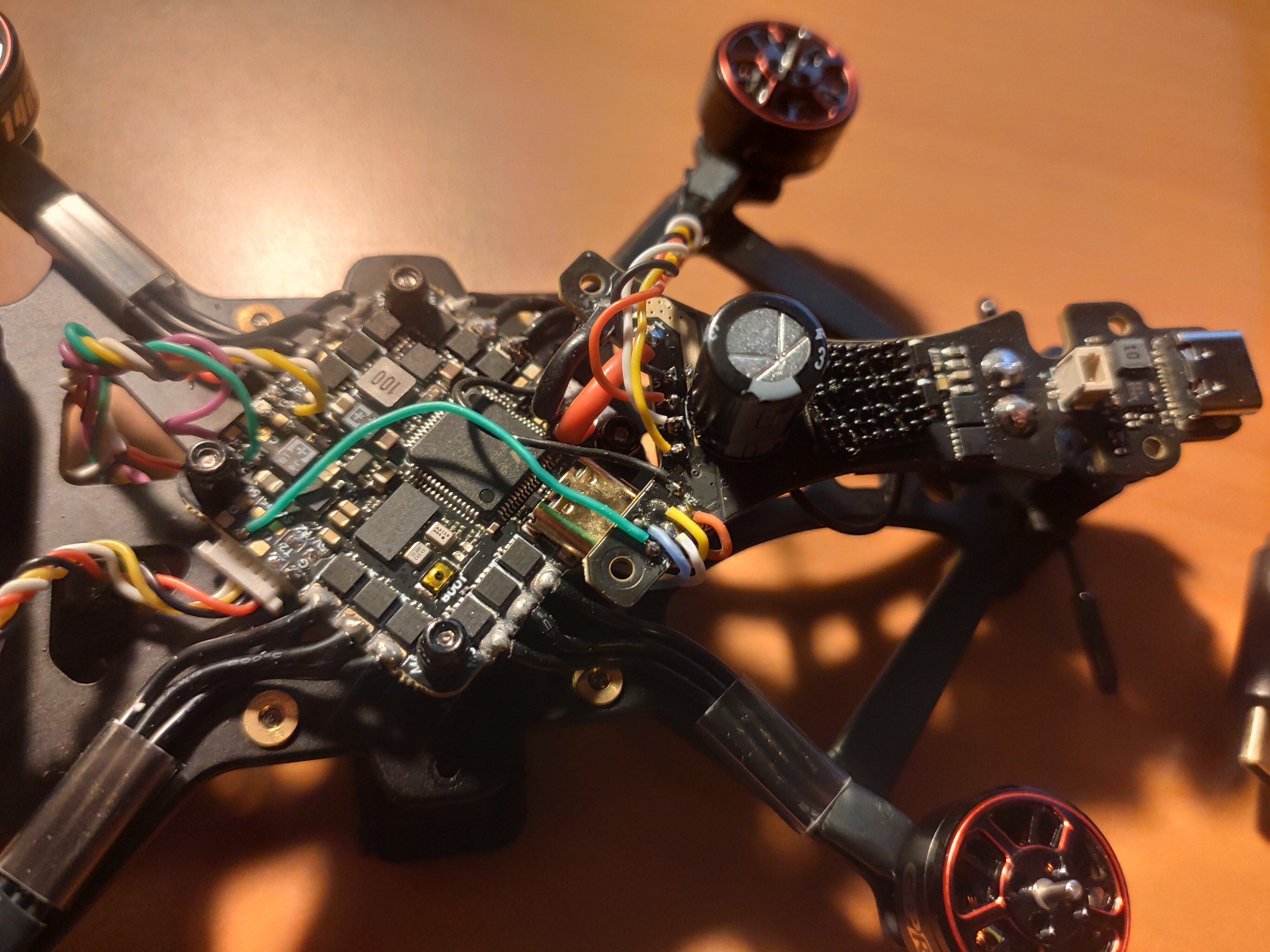
I am writing regarding the new flight controller I received in my recent order (Order #4451).
The board initially connected to Betaflight, but after an attempted firmware flash failed, the board is now completely unresponsive.
It will not enter DFU mode when I hold the BOOT button. The device does not appear in Device Manager at all, even as an unknown device.
I have confirmed this is not a driver or PC issue, as another flight controller connects successfully to my PC in both normal and DFU modes.
This suggests a hardware failure in the low-level bootloader section of the MCU. Could you please advise on how to proceed with a replacement?
Thank you,
Rink van Hartingsveldt, Rinkvh@gmail.com
The board initially connected to Betaflight, but after an attempted firmware flash failed, the board is now completely unresponsive. Crucially, it will not enter DFU mode when I hold the BOOT button. The device does not appear in Device Manager at all, even as an unknown device. The red led lights up on the board, but the blue light does not. Another flight controller connects successfully to my PC, with the same usb cable in both normal and DFU modes.
Sorry to hear about this, my suggestion is that since items have already been soldered to teh FC, its a chance that something here has caused an issue so best to remove that all carefully, check for any bridged/shorted connections (or solder splash) and only proceed to add power to the board once this is done.
Then once that is done then you can try to boot the FC in DFU mode, and once connected in DFU you should hopefully at least see the power LED on, and then if no DFU device detected, try to update your DFU drivers as this sometimes refreshes the driver stack and will cause the FC to be detected.
If you feel your FC has a fault, this guide will help you to troubleshoot some things, so let me know if you see anything here and we can then pass this onto GepRC to ask them for some more help.
I unsoldered all wires, and connected the cable with the boot button pressed. The blue light went flashing, and I could see it in my device manager again!
After about 10 seconds though, the blue light went out again and it disappeared from my device manager list. After plugging it in again and running ‘impulse rc driver fixer’ which worked, I could connect it to Betaflight normally. However, when I tried to flash new firmware, it would not work, and lose connection.
I then tried to use zadig again, having powered the board with the boot button pressed, to reinstall the driver for ‘stm32 bootloader’, this worked successfully according to zadig. I restarted my computer while the FC was in DFU mode.
Now I’m getting the same thing again. When I plug it in, whether I’m holding the boot button or not, only the red led turns on, and I don’t see it in my device manager or betaflight.
I visited the ‘check mcu’ page, and while I don’t have a multimeter right now, and don’t see a 3.3v pad on this FC (could it also be Vi or Vo?), I felt the board when powered to usb, and it didn’t get hot to the touch.
I am really confused at this point, I have measured my joints before with a multimeter, and found no shorts, and I will measure again tomorrow, while I have no wires connected.
Just wanted to add one more thing, I have it plugged in now, and it is connecting and disconnecting repeatedly now, without me touching it, with an error message:
“Onbekend USB- apparaat. Dit apparaat is gestopt omdat er problemen zijn gerapporteerd. (Code 43) A request for the USB device descriptor failed.”
Very confusing.
I’m still struggling with updating the firmware, I would really appreciate hearing from you.
If you have no further ideas, could it fall under warranty, since I was not able to measure any shorts?
Thanks for your message, and sorry to hear you’re still having trouble, I appreciate your patience.
To help us narrow this down, could you let me know exactly which step of the firmware update process you’re getting stuck on? For example:
Does the board get detected by your computer?
Are you able to enter bootloader/DFU mode successfully?
Is there a specific error message shown during flashing, or does the process fail silently?
If possible, a screenshot or short description of the exact point where it stops would be really helpful.
Regarding warranty: at this stage we’ll need to fully understand where the update process is failing before we can determine whether it would fall under warranty, especially as soldering has already been carried out on the board. Once we have the above details, I can advise on the next best steps.
Looking forward to your reply so we can get this moving.