Order Number: 719346
Product Name: Hglrc Draknight 2-Inch Toothpick Fpv Drone (Elrs)
Brand: HGLRC
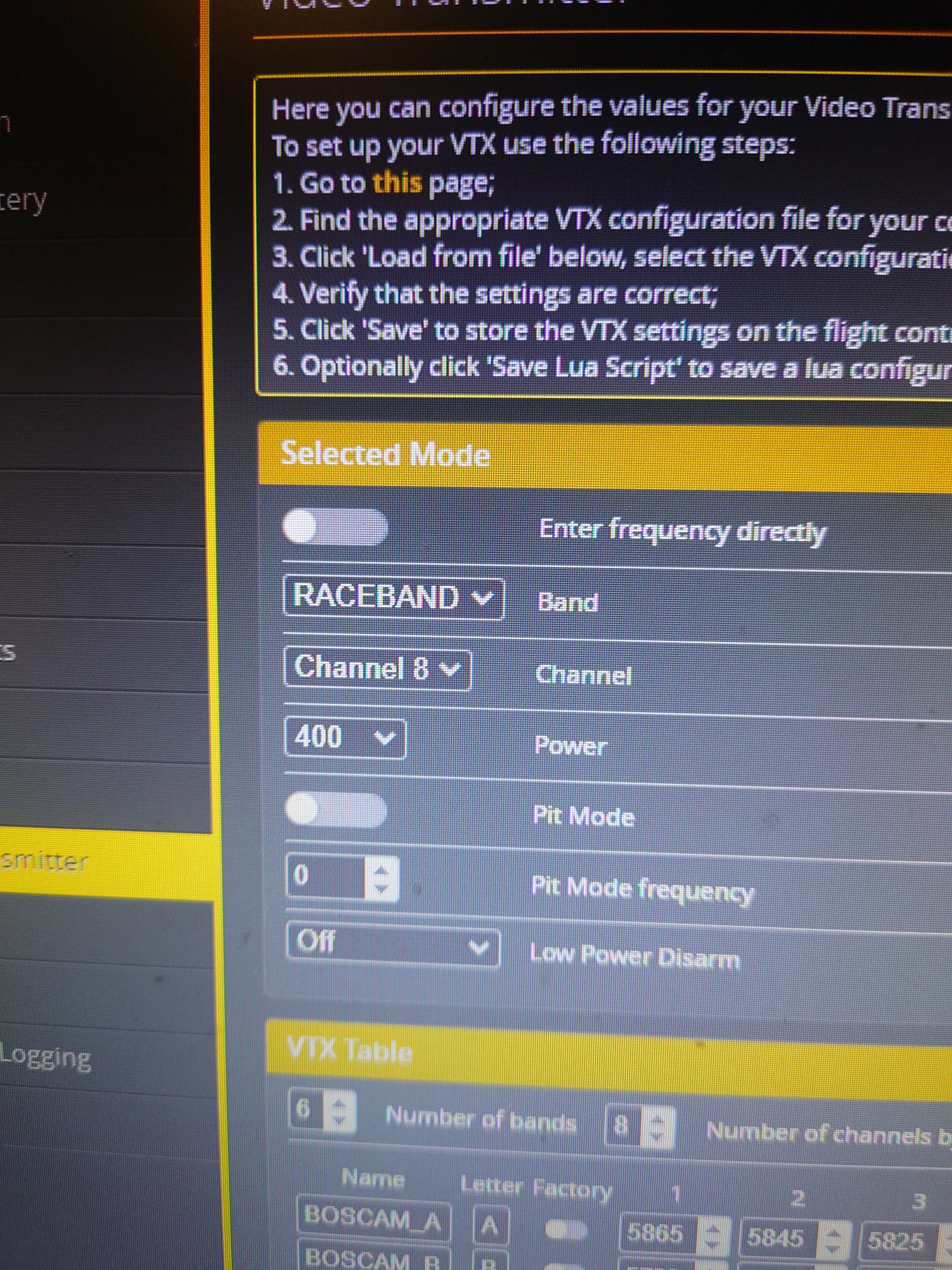
My draknight was flying fine yesterday, I only flew 2 packs and I didn’t have any crashes or anything yesterday. I go to fly it today and the video isnt trasmitting to the goggles. I searched the channels with my goggles and found it is outputting on A2/3 instead of R8 which is what I usually use. The range is terrible on A2/3 but it is the only channel I am getting video to. I have tried resetting the drone in betaflight and installing a new antenna but the issue is still the same. i have reset the drone and used the cli dump file to try and get it back to factory settings, even though the only things I configured was the rates and osd when I first got it. I have only flown it for about 10 packs and it’s only started doing this today. It’s had a few small crashes into grass on the garden but it has always carried on flying fine. Just wondering if you have ever seen anything like this? Is my aio dead?
I have tried resetting the drone in betaflight, and then flashing with a CLI dump, then I installed a new antenna but the issue is still the same.
I have been sent the vtx table from HGLRC and I have flashed that with betaflight and t he issue is still the same.

Thank you for reaching out to us and for providing such a detailed description of the issue with your HGLRC Draknight drone (Order # 719346), along with all the troubleshooting steps you’ve already taken. We understand how frustrating it must be for the VTX to suddenly stop working correctly, especially when you haven’t had any major crashes.
You’ve done an excellent job troubleshooting this. Resetting Betaflight, applying the CLI dump, flashing the official VTX table from HGLRC, and even trying a new antenna covers all the usual software and basic hardware fixes we would typically suggest.
Given that the problem (transmitting on the wrong channel A2/3 with very poor range, instead of R8) persists despite all these steps, it strongly suggests that the issue is likely not a simple configuration error but rather points towards a potential hardware fault within the video transmitter (VTX) section of the All-In-One (AIO) board. This could potentially be an issue with the VTX’s power amplifier (explaining the poor range) or its control circuitry (explaining the incorrect channel). While unfortunate, hardware components can sometimes fail unexpectedly even without severe impacts.
Our Next Step:
We have compiled the information you provided and have contacted HGLRC support directly on your behalf. We’ve detailed the symptoms and the extensive troubleshooting you’ve performed, and asked for their technical advice, suggestions for any further diagnostics, or guidance on how to proceed under warranty if they also suspect a hardware failure.
What Happens Now:
We will need to wait for a response from HGLRC. They may have further specific checks they’d like performed, or they may provide instructions for a warranty claim or replacement based on the information.
We will keep you updated as soon as we hear back from them. Please know that we’ll do our best to help facilitate a resolution for you.
Thanks again for your patience and detailed report.
Kind Regards
Alex
Unmanned Tech Support
Join our community at dronetrest.com, or on Discord.
Hi
It seems that HLGRC are not accepting that this is due to a manufacturing defect and suggesting that something like wet grass could of damaged the VTX. However they are offering a 50% discount on a replacement AIO for this drone. We can then cover the other half ourself as a gesture of goodwill. If you wish to do this, please let me know so I can get this sorted out of you (we do not have stock of the FC at the moment)
Kind Regards
Alex
Unmanned Tech Support
Join our community at dronetrest.com, or on Discord.
Okay no problem that would be perfect. I do not mind paying for the aio but I really appreciate it for covering that cost. Thank you for sorting this out for me.
Hi Kirk good day,
I’m glad we could assist with this, HGLRC were really nice to offer the 50% refund even though it was not faulty.
Not a lot of companies would offer this to be honest.
Would you be able to send us the old one that isn’t working, you can use our return label at the link below.
An RMA (Return Merchandise Authorization) has been created for your order.
You should receive an email shortly at the address associated with your order. This email will contain:
-
Your RMA number
-
A link to our RMA form
-
Instructions for completing the return process
Please check your inbox (and spam folder) for this email. If you don’t receive it within the next hour, please let us know here.
Remember to complete the RMA form and initiate your return within 30 days. If you have any questions, feel free to ask them in this thread.
Hope this helps.
If there is anything else I can help with please do let me know?
Regards,
David
Unmanned Tech Support
Hi everyone, I’ve been having the exact same issues as described by kirkgamble in the very beginning when I first got the quad it seemed to be the output channel and frequency to match my Osd after a few flights vtx set at 400mw through betaflight cli and making sure through Osd check the power manually but would only stay there for the current flight or until disarmed the it would revert to 25mw and yes with low power disarm =off double checked through the cli, I would have to reset to 400 on osd every time I changed packs or disarmed , I did contact hglrc support after pasting my original diff all vtx table multiple times with no luck, somtimes the osd would show ? for power I never changed the power vakues that came with the quad! well they sent me a diff all if the current draknight with a vtx table that had nothing in common with m origonal hears what they sent.
vtxtable
vtxtable bands 6
vtxtable channels 8
vtxtable band 1 BOSCAM_A A CUSTOM 5865 5845 5825 5805 5785 5765 5745 5725
vtxtable band 2 BOSCAM_B B CUSTOM 5733 5752 5771 5790 5809 5828 5847 5866
vtxtable band 3 BOSCAM_E E CUSTOM 5705 5685 5665 0 5885 5905 0 0
vtxtable band 4 FATSHARK F CUSTOM 5740 5760 5780 5800 5820 5840 5860 5880
vtxtable band 5 RACEBAND R FACTORY 5658 5695 5732 5769 5806 5843 5880 5917
vtxtable band 6 LOWRACE L CUSTOM 5333 5373 5413 5453 5493 5533 5573 5613
vtxtable powerlevels 5
vtxtable powervalues 10 2 14 20 26
vtxtable powerlabels 0 RCE 25 100 400
With this I was able to stay in 400mw or any other power that I wanted all the time it still doesn’t work with low power disarm ,until first arm none at I got 400 mw all the time i just leave it there as of yesterday I did nothing new to the software or the hardware ,I just changed out the frame and rails everything back together as it was go to fly my goggles are not picking up osd ,I scan in the goggles after the third time I get video on band 2 BOSCAM and i think channel 4and 400m w don’t know how that’s possible double checked in betaflight everything still set how I had it raceband 5 ch 1 400mw double checked cli to confirm ?? I’m baffled don’t know what to do at this point I don’t know how good it’s going to fly on that band we got a winter storm here and wasn’t able to fly, so I don’t know contact hglrc support? it took a week and a half to get a response. if anyone could make sense of this and knows what’s going on or what else to do please let me know thank you!
Hi there,
Thanks for taking the time to describe this in detail — that’s really helpful.
From everything you’ve described it sounds like the issue is related to how Betaflight’s VTX control and “low power on disarm” feature interact with the VTX table and your current configuration.
A few things to bear in mind that will help explain what you’re seeing:
 1. Low Power on Disarm behaviour
If vtx_low_power_disarm is enabled in Betaflight, the firmware will command the VTX to set its power to the lowest level (typically 25 mW) when the quad is disarmed. That’s standard behaviour as per the Betaflight documentation — it’s meant to reduce unnecessary power output while the quad is sitting idle. (Betaflight)
However, what often trips people up is that:
- The VTX remembers the last commanded power level and can report that on startup until the disarm logic actually kicks in.
- If you’re using a VTX control switch or SmartAudio / Tramp control mapped to an AUX channel, that can override the low-power disarm behaviour, causing the VTX to stay at your selected power instead of dropping to 25 mW. (GitHub)
This means you may see power levels behave inconsistently between battery cycles, OSD reports, and actual flight behaviour.
2. VTX tables and settings in Betaflight
The diff you pasted looks like a valid VTX table which should work, but there are a few gotchas:
- OSD values sometimes don’t show correct power or channel if the telemetry between the FC and the VTX isn’t configured correctly.
- If the VTX table isn’t matching the actual VTX hardware or protocol (e.g., SmartAudio vs. Tramp), the OSD may show
?or fall back to defaults. - Betaflight stores the VTX settings in its EEPROM, and if a low-power on disarm is set then the stored value may be the low power level — which is why after a disarm/arm cycle it looks like it “reverts.”
3. What you can try next
A few things that tend to help:
 Try disabling ‘Low Power on Disarm’
In CLI:
set vtx_low_power_disarm = OFF
save
Then set your desired power and reboot. That often makes the behaviour consistent across battery cycles.
Verify SmartAudio/Tramp wiring and port settings
Ensure the VTX control pin is actually on the UART where SmartAudio or Tramp is enabled — if the protocol isn’t working correctly then Betaflight may not be actually writing the settings to the VTX.
Use a LUA script from your radio or OSD menus to change VTX settings
If VTX control isn’t working through just Betaflight CLI/OSD, using a LUA script (e.g., VTXProg.lua) can give more reliable control.